
How it works
There are three pieces: the robot, the broker, and the operator’s browser. You never connect to the robot directly.- The robot dials out. When you run a
teleop-hosted-go2-*blueprint, the robot opens an outbound WebRTC session to the broker and registers itself. Because the robot initiates the connection, no inbound ports or port forwarding are needed — it works from behind any NAT. - The broker bridges the session. It sits between the robot and the operator, relaying video, the minimap, telemetry, and your commands. It also handles login and decides which operators may connect to which robots.
- You connect from the browser. Open the console, pick your robot, and click Connect. The browser pulls the robot’s video track and opens the command/telemetry data channels back to it.
All broker-facing modules share a single broker session, so there’s exactly
one video track and one control plane per robot — see
How it connects for the channel-level detail.
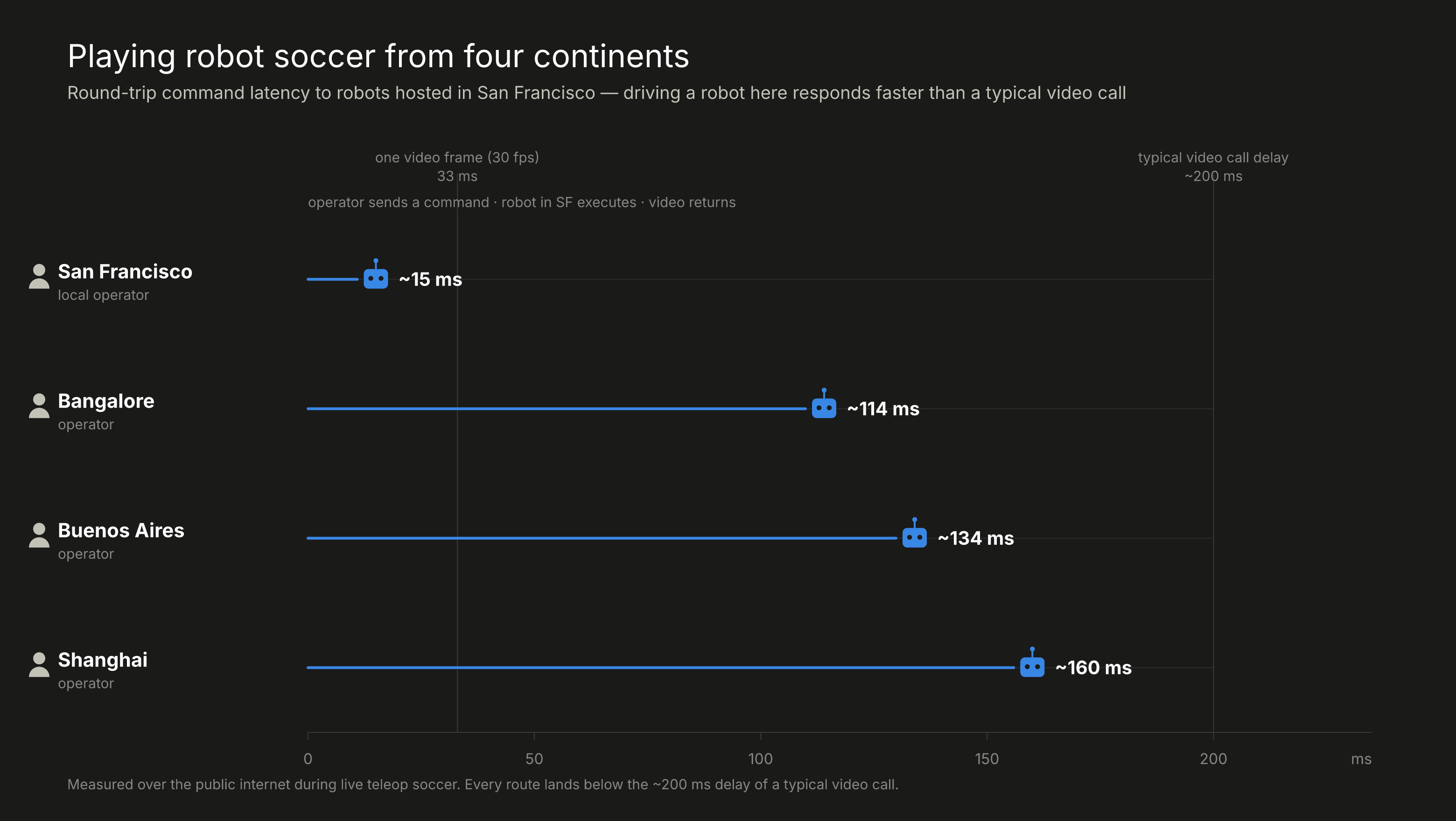
How low is the latency in practice? With the World Cup on, four Dimensional teammates across the globe; San Francisco, Bangalore, Buenos Aires, and Shanghai played soccer with Go2s hosted in SF, over the public internet.
Below are the latencies recorded:
Quick Start
TRANSPORTS__BROKER__ROBOT_ID / TRANSPORTS__BROKER__ROBOT_NAME are optional
overrides. All broker settings can also be passed on the CLI, e.g.
-o transports.broker.api_key=dtk_live_....
Get an API key
- Visit teleop.dimensionalos.com and sign up.
- On the dashboard, API Keys → + New Key.
- Copy the key (shown once) and pass it as
TRANSPORTS__BROKER__API_KEY.
Available blueprints
The transport blueprints bind
Cloudflare* transports directly to the streams
of several small, per-concern modules: Go2CommandModule (command / E-STOP /
drive guard), CameraMuxModule (camera → video track), MapCompressModule
(costmap → minimap), and HostedStatsModule (telemetry + acks). The
broker-bound modules run in one worker so they share a single broker session;
the GO2Connection driver runs in a second worker (n_workers=2).
Enable the glass-to-glass latency benchmark with
-o cameramuxmodule.latency_stamp=true.
Operating the robot
Once the robot is running and you’ve clicked Connect, here’s how to operate it.1. Connect
Open teleop.dimensionalos.com, find your robot under Available Robots, and click Connect. Video appears once the WebRTC session negotiates; the metrics HUD starts populating once telemetry arrives. If the robot doesn’t show up, confirm the blueprint is still running and that the API key matches the one the robot registered with.2. Drive
Use WASD on a desktop keyboard (or the thumbsticks in VR) to drive:W/S forward/back, A/D strafe, and turn with the yaw controls.
Hold Shift for 2× speed, Ctrl for half speed. Drive input streams
continuously and stops the instant you release — the robot treats a released
key as “stop,” so it never keeps coasting on a dropped packet.
3. Navigate with the minimap
The minimap shows the robot’s costmap and live pose. Click any point on it to send a navigation goal — the robot plans a path and drives there on its own, avoiding obstacles. Give a manual drive command at any time and it takes over immediately, cancelling the plan. There’s also a cancel control to stop navigating without driving manually.4. Postures and commands
The command bar exposes the robot’s allow-listed actions:- Stand / sit / recover —
RecoveryStand,StandDown,Sit, andDamp(relax the joints). - Greetings / stretch —
Hello,Stretch. - Acrobatics —
FrontJump,FrontPounce— only available when the robot was launched with-o go2commandmodule.allow_acrobatics=true. - Obstacle avoidance — toggle the onboard avoidance layer on or off.
- Rage mode — toggle the high-agility gait on or off.
- Head LED — set the head light brightness.
- Camera — on multicam robots, pick which camera (or side-by-side view) the video track shows.
5. E-STOP
The E-STOP control is always available. It immediately stops all motion, cancels any active navigation, and damps the robot — and it takes priority over everything else in flight. Clear it with estop_clear (or the equivalent control) when you’re ready to resume; the robot won’t move again until you do.Operator inputs
The browser is modality-agnostic — it streams whatever the device gives it, and the robot blueprint decides what to do with it.
Shift = 2× speed, Ctrl = ½×. The operator can also send allow-listed sport
commands (StandDown, RecoveryStand, Sit, Damp, Hello, Stretch, and — gated
behind
allow_acrobatics — FrontJump, FrontPounce),
toggle obstacle avoidance / rage mode / the head LED, pick the camera, E-STOP,
and click the minimap to navigate.
Live metrics HUD
While connected, the operator sees a metrics overlay, color-coded on video and command-plane health:
Pair with the recorder to log a session and emit a stats report:
recording_teleop_<ts>.db + a report_<ts>.json on disconnect;
regenerate from an old .db with python -m dimos.teleop.utils.report path.db.
Configuration
Each concern is its own module, so its commonly-tuned fields live under that module’s config key (module class name, lowercased). Pass with-o, e.g.
-o hostedstatsmodule.telemetry_hz=5.
hostedstatsmodule — HostedStatsModule:
go2commandmodule — Go2CommandModule:
cameramuxmodule — CameraMuxModule:
mapcompressmodule — MapCompressModule:
Broker settings live under
transports.broker.*: api_key (required),
broker_url, robot_id, robot_name ("robot" default), stun_url, and
video_codec (e.g. h264/vp8).
How it connects
The per-processBrokerProvider owns the session; blueprint transports bind
to it. Channels:
dimos/teleop/hosted/README.md.